Event registration best practices can make or break your next conference, trade show, or corporate gathering. You spent months planning the perfect event, booking speakers, locking in the venue, and packing the agenda with value. But if your registration process creates friction, you will lose attendees before they ever walk through the door.
Ready to put event registration best practices to work? Explore The Event Planner Expo ticket options →
Event registration best practices go far beyond choosing a ticketing platform. From the moment a potential attendee lands on your registration page to the day they check in at your event, every touchpoint either builds momentum or creates dropout risk. The difference between a sold-out event and one with empty seats often comes down to how well you manage the registration experience.
This guide breaks down the registration strategies that consistently drive higher signups, stronger attendance rates, and better attendee experiences, drawing from lessons learned producing events with 2,500+ attendees and 150+ exhibitors in New York City.
What Is Event Registration and Why Does It Matter?
Event registration is the process through which attendees sign up, provide their information, select ticket types, and complete payment for your event. It is the critical conversion point where interest becomes commitment.
A well-designed registration process does three things simultaneously:
- Converts browsers into attendees by reducing friction at every step
- Collects valuable data that helps you personalize the event experience
- Sets expectations about what attendees will gain from showing up
According to industry benchmarks, events that optimize their registration flow see 20-35% higher conversion rates compared to those using generic forms. That difference can mean hundreds of additional signups for a single event.
What Are the 7 Event Registration Best Practices That Drive More Signups?
The seven most effective event registration best practices are simplifying your registration form, building a high-converting registration page, using tiered pricing with early-bird incentives, optimizing for mobile, accepting multiple payment options, leveraging social proof, and providing dedicated registration support. Together, these strategies address every stage of the signup funnel and consistently drive higher conversion rates.
1. Simplify Your Registration Form
Every additional field on your registration form costs you conversions. Research consistently shows that shorter forms perform better, yet many event organizers still ask for information they never use.
What to include on your form:
- Full name
- Email address
- Company name and job title (for B2B events)
- Ticket type selection
- Payment information
What to remove or make optional:
- Dietary restrictions (collect this closer to the event date)
- Session preferences (handle through a post-registration survey)
- How-did-you-hear-about-us fields (use UTM tracking instead)
- Phone numbers (unless essential for day-of communication)
The goal is to get registrants through the form and into a confirmed state as quickly as possible. You can always gather additional details through follow-up emails after they have committed.
2. Build a Registration Page That Converts
Your registration page is a sales page, not just a form. It needs to answer three questions every visitor has: What will I get? How much does it cost? Why should I act now?
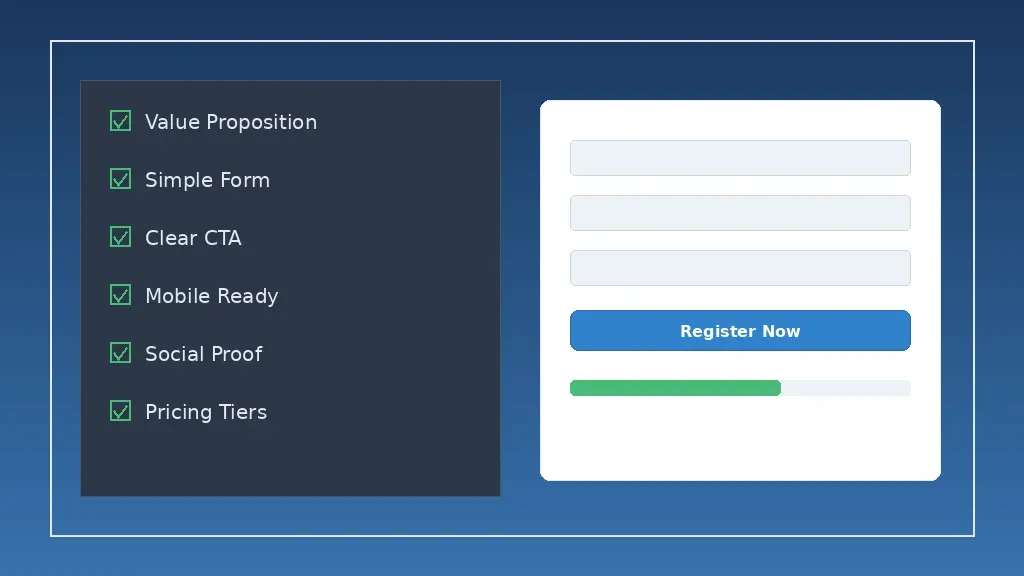
High-converting registration pages include:
- A clear value proposition above the fold that tells visitors exactly what the event delivers
- Social proof such as past attendee counts, testimonials, or recognizable speaker names
- Transparent pricing with all ticket tiers visible so visitors can self-select
- A prominent call-to-action button using specific language like “Reserve Your Spot” or “Register Now” instead of generic “Submit” buttons
- Urgency indicators such as early-bird deadlines, remaining capacity, or countdown timers
The Event Planner Expo ticket page demonstrates this approach with six distinct ticket tiers ranging from General Admission to Corporate All Access, each clearly listing what is included so attendees can quickly find the right fit for their budget and goals.
3. Use Tiered Pricing and Early-Bird Incentives
A single price point leaves money on the table and limits your audience. Tiered pricing lets you serve different buyer segments while maximizing revenue per attendee.
Effective pricing tiers typically include:
- Entry-level access for price-sensitive attendees who want the core experience
- Standard access that includes sessions and networking
- Premium or VIP access with exclusive benefits, priority seating, and additional networking opportunities
- Group or corporate packages that incentivize team attendance with per-person discounts
Early-bird pricing accelerates registration momentum by rewarding early commitment. Structure your early-bird strategy with clear deadlines:
- Super early-bird (3-6 months before the event): 25-30% discount
- Early-bird (2-3 months before): 15-20% discount
- Standard pricing (final weeks): full price with urgency messaging
This creates multiple waves of registration activity instead of a last-minute rush, which gives you better forecasting data and cash flow.
4. Optimize for Mobile Registration
More than 60% of event discovery now happens on mobile devices, yet many registration pages still deliver a poor mobile experience. If your form requires pinching, zooming, or horizontal scrolling, you are losing registrants.
Mobile optimization checklist:
- Single-column form layout that flows naturally on small screens
- Large, tappable buttons (minimum 44×44 pixels)
- Auto-fill support for name, email, and payment fields
- Digital wallet integration (Apple Pay, Google Pay) for one-tap checkout
- Progress indicators so registrants know how many steps remain
- Fast page load times (under 3 seconds on mobile networks)
Test your entire registration flow on multiple mobile devices before launching. Walk through it yourself on your phone, and ask colleagues to do the same. Small friction points that are invisible on desktop become deal-breakers on mobile.
5. Accept Multiple Payment Options
Payment friction is one of the top reasons for registration abandonment. The more ways you let people pay, the fewer barriers stand between interest and confirmation.
Payment options to support:
- Credit and debit cards (Visa, Mastercard, American Express)
- Digital wallets (Apple Pay, Google Pay, PayPal)
- Buy now, pay later options for higher-priced tickets
- Invoice billing for corporate group purchases
- Discount codes and promotional pricing
Display security badges and SSL certification prominently on your payment page. For corporate events where attendees need employer approval, offer the option to reserve a spot with payment due within 7-14 days.
See how seamless event registration looks in practice. Browse The Event Planner Expo ticket tiers to experience a registration flow built on these best practices.
6. Leverage Social Proof Throughout the Registration Flow
People register for events that other people are attending. Social proof reduces the perceived risk of committing time and money to your event.
Effective social proof elements include:
- Attendee counter: “Join 1,200+ event professionals already registered”
- Recognizable logos: Display companies whose employees have registered or attended in past years
- Testimonials: Short quotes from past attendees focused on specific outcomes they achieved
- Speaker credentials: Highlighting well-known keynote speakers signals event quality and draws registrations
- Scarcity signals: “Only 50 VIP spots remaining” (only if accurate)
Place social proof at key decision points: near the pricing section, adjacent to the registration button, and in abandonment recovery emails.
7. Provide Dedicated Support During Registration
Not every question is answered on your registration page, and unanswered questions kill conversions. Make it easy for potential registrants to get help before they abandon the process.
Support options to consider:
- Live chat or chatbot on the registration page
- A visible FAQ section addressing common questions about pricing, refunds, and what is included
- A dedicated email address for registration inquiries with a response time guarantee
- Group registration assistance for corporate buyers purchasing multiple tickets
For large conferences, a dedicated registration support person during peak signup periods can recover thousands of dollars in would-be abandoned registrations.
How to Reduce No-Shows and Maximize Attendance
Reducing event no-shows requires a multi-touch approach that combines email nurture sequences, calendar integrations, pre-event community building, and strategic pricing. These strategies work together to lower no-show rates by 15-25% for paid events and even more for free events, keeping your venue full and your ROI strong.
Getting people to register is only half the battle. The real challenge is making sure they actually show up. Industry averages show no-show rates between 20-30% for free events and 5-15% for paid events. Here is how to push those numbers down.
Build an Email Nurture Sequence
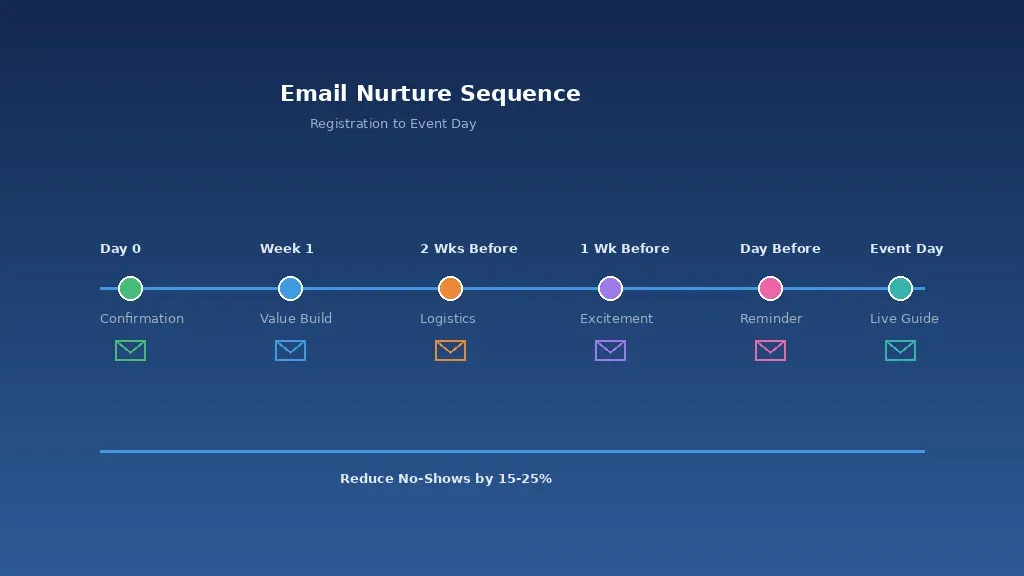
The period between registration and event day is when excitement fades and calendar conflicts emerge. A strategic email sequence keeps your event top of mind and builds anticipation.
Recommended email cadence:
| Timing | Email Purpose | Key Content |
|---|---|---|
| Immediately | Confirmation | Receipt, calendar invite link, what to expect |
| 1 week after registration | Value reinforcement | Speaker spotlight, session highlights, networking opportunities |
| 2 weeks before event | Logistics | Venue details, parking, nearby hotels, schedule overview |
| 1 week before event | Excitement builder | Final agenda, app download, attendee networking preview |
| 1 day before event | Final reminder | Check-in instructions, what to bring, last-minute tips |
| Day of event | Day-of guide | Real-time updates, session reminders, location maps |
Each email should include a clear call to action: share the event with a colleague, download the event app, or add specific sessions to their personal schedule. Keeping registrants engaged throughout the lead-up period dramatically reduces no-show rates.
Use Calendar Integrations
Make it effortless for registrants to add your event to their calendar. Include one-click “Add to Calendar” buttons (Google Calendar, Outlook, Apple Calendar) in your confirmation email and on the confirmation page.
Events that include calendar integrations in their registration flow see 15-25% lower no-show rates compared to those that do not. A calendar entry serves as a persistent reminder that keeps your event visible in the attendee’s daily workflow.
Create a Community Before the Event
When attendees connect with other registrants before the event, they develop social accountability that makes them far more likely to attend. Consider these pre-event community tactics:
- A private LinkedIn group or Slack channel for registered attendees
- An event-specific networking platform where attendees can schedule 1:1 meetings
- Pre-event virtual meetups or webinars that preview event content
- Attendee spotlights shared via email or social media
Conferences like The Event Planner Expo create year-round engagement with VIP ticket holders through exclusive events and networking invitations, which builds loyalty and drives repeat attendance year after year.
What Should You Include on a Registration Page Optimization Checklist?
A complete registration page optimization checklist covers four essential areas: page design and user experience including a clear value proposition, simple form, and fast load times; pricing and payment with visible tiers, multiple payment methods, and a refund policy; social proof and trust elements like testimonials, speaker credentials, and attendee counts; and the post-registration experience with immediate confirmation, calendar links, and email nurture sequences.
Use this checklist to audit your event registration experience before launching:
Page Design and User Experience
- Value proposition is clear above the fold
- Registration form has 5 or fewer required fields
- CTA button uses action-specific language (“Register Now,” “Save Your Spot”)
- Page loads in under 3 seconds on mobile
- Form works on all major browsers and devices
- SSL certificate is active and security badges are visible
Pricing and Payment
- All ticket tiers and pricing are displayed clearly
- Early-bird deadlines are visible with countdown timers
- Multiple payment methods are accepted
- Group or corporate discount options are available
- Refund and cancellation policy is accessible
Social Proof and Trust
- Past attendee testimonials are featured
- Speaker names and credentials are highlighted
- Attendee count or registration momentum is shown
- Recognizable company logos are displayed
Post-Registration Experience
- Confirmation email sends immediately with all essential details
- Calendar invite link is included
- Email nurture sequence is scheduled and tested
- Attendee can easily modify or cancel their registration
What Are the Most Common Event Registration Mistakes?
The most common event registration mistakes include asking for too much information upfront, hiding pricing details, neglecting the post-registration confirmation experience, sending only one reminder email, and failing to recover abandoned registrations. Each of these errors directly reduces signups and increases no-shows, costing event planners revenue they could have captured with simple process changes.
Even experienced event planners make registration mistakes that cost them attendees. Here are the most common pitfalls and how to fix them:
Asking for Too Much Information Upfront
Long forms with 10+ fields feel like a job application, not an event signup. Every unnecessary field increases abandonment. Ask only what you need to confirm the registration and process payment. Collect the rest later.
Hiding the Price
When attendees cannot find pricing information, they assume the event is either too expensive or not transparent. Display all pricing tiers prominently on your registration page. For B2B events with custom pricing, at minimum show starting prices and a clear path to get a quote.
Neglecting the Confirmation Experience
The moment after someone registers is when their excitement peaks. A generic “Thank you for registering” page wastes this momentum. Instead, use the confirmation page to encourage social sharing, offer session selection, or promote upgrades to higher ticket tiers.
Sending Only One Reminder Email
A single reminder the day before your event is not enough to prevent no-shows. Build the full nurture sequence outlined above to maintain engagement from registration through event day.
Ignoring Abandoned Registrations
Not everyone who starts the registration process finishes it. Implement abandoned registration recovery emails that trigger 1-2 hours after someone leaves the form without completing payment. These emails recover 10-15% of abandoned registrations on average.
How Does Event Technology Improve Registration Performance?
Event technology improves registration performance by automating email workflows, enabling real-time analytics on conversion rates, supporting A/B testing of registration pages, and integrating with CRM and marketing platforms. The right tools create a seamless attendee experience from signup to check-in while giving organizers data to optimize every step of the funnel.
The right event technology streamlines registration and provides data that helps you optimize over time. Here is what to look for in a registration platform:
- Customizable forms that match your brand and event type
- Real-time analytics showing registration velocity, conversion rates, and traffic sources
- Automated email workflows for confirmations, reminders, and follow-ups
- Integration capabilities with your CRM, email marketing platform, and event management tools
- Attendee self-service portals where registrants can modify their information, upgrade tickets, or add sessions
- Group registration features that allow corporate buyers to register multiple attendees in one transaction
Platforms that provide A/B testing capabilities for your registration page are especially valuable. Test different headlines, pricing presentations, and CTA button copy to find what converts best for your specific audience.
What Metrics Should You Track to Measure Registration Success?
The key metrics for measuring event registration success include registration conversion rate (benchmark: 15-25%), form abandonment rate (target: under 30%), time to completion (under 3 minutes), traffic source performance, ticket tier distribution, no-show rate, and early-bird uptake percentage. Tracking these numbers after every event reveals your biggest conversion bottlenecks and shows where optimization will have the greatest impact.
You cannot improve what you do not measure. Track these metrics to continuously optimize your event registration process:
- Registration conversion rate: Percentage of page visitors who complete registration (benchmark: 15-25%)
- Form abandonment rate: Percentage who start but do not finish the form (benchmark: under 30%)
- Time to completion: Average time from landing on the page to confirmed registration (target: under 3 minutes)
- Traffic source performance: Which channels (email, social, organic search, paid ads) drive the most registrations
- Ticket tier distribution: Percentage of registrants choosing each pricing level
- No-show rate: Percentage of registrants who do not attend (benchmark: under 15% for paid events)
- Early-bird uptake: Percentage of total registrations that come during discounted periods
Review these metrics after every event and compare them to previous years. Identify where your biggest dropoff points are and focus your optimization efforts there.
Frequently Asked Questions About Event Registration
What is the best time to open event registration?
Open registration 3-6 months before your event for large conferences and 4-8 weeks before for smaller events. This gives you enough runway for early-bird pricing tiers and allows corporate attendees time to get budget approval. Launch with your strongest promotional push to build early momentum.
How many fields should an event registration form have?
Keep required fields to 5 or fewer: name, email, company, job title, and ticket selection. Every additional required field reduces completion rates by approximately 5-10%. Collect supplementary information through post-registration surveys or pre-event emails.
What is a good registration conversion rate for events?
A healthy registration conversion rate for event landing pages ranges from 15-25%, depending on your traffic sources and pricing. Paid advertising traffic typically converts at 10-15%, while email marketing traffic converts at 25-40% since those visitors already know your brand.
How do I reduce no-shows at my event?
The most effective no-show reduction strategies include charging for attendance (even a small fee cuts no-shows significantly), sending a multi-touch email nurture sequence, creating pre-event community engagement, and making it easy for registrants to transfer their tickets to a colleague if they cannot attend.
Should I offer refunds for event registration?
Yes. A clear, reasonable refund policy actually increases registrations by reducing perceived risk. Offer full refunds up to 30 days before the event, 50% refunds up to 14 days before, and allow ticket transfers at any time. The registrations you gain from a generous policy far outweigh the occasional refund.
How Can You Start Improving Your Event Registration Today?
Improving your event registration process is one of the highest-leverage activities in event marketing. Small changes to your form design, pricing structure, and follow-up sequences compound into significantly more registrations and higher attendance rates.
Start with the quick wins: simplify your form, add social proof near your CTA, and build out at least a 3-email nurture sequence. Then layer in tiered pricing, mobile optimization, and abandoned registration recovery as you refine your process.
Want to see event registration best practices in action? Explore The Event Planner Expo ticket options to see how tiered pricing, clear value communication, and streamlined registration work together to drive signups for NYC’s premier event industry conference.