Hybrid Event Planning Guide: How to Seamlessly Blend In-Person and Virtual Experiences
Hybrid events work when in-person guests and virtual attendees feel like they are part of the same experience, not two separate versions of it. This hybrid event planning guide walks through the technology, programming, engagement, staffing, and budget decisions that help planners deliver equal value across the room and the screen.
Planning your next major conference or brand event? Explore The Event Planner Expo ticket options to see how a large-scale event can combine New York City energy with virtual access.
What Is Hybrid Event Planning?
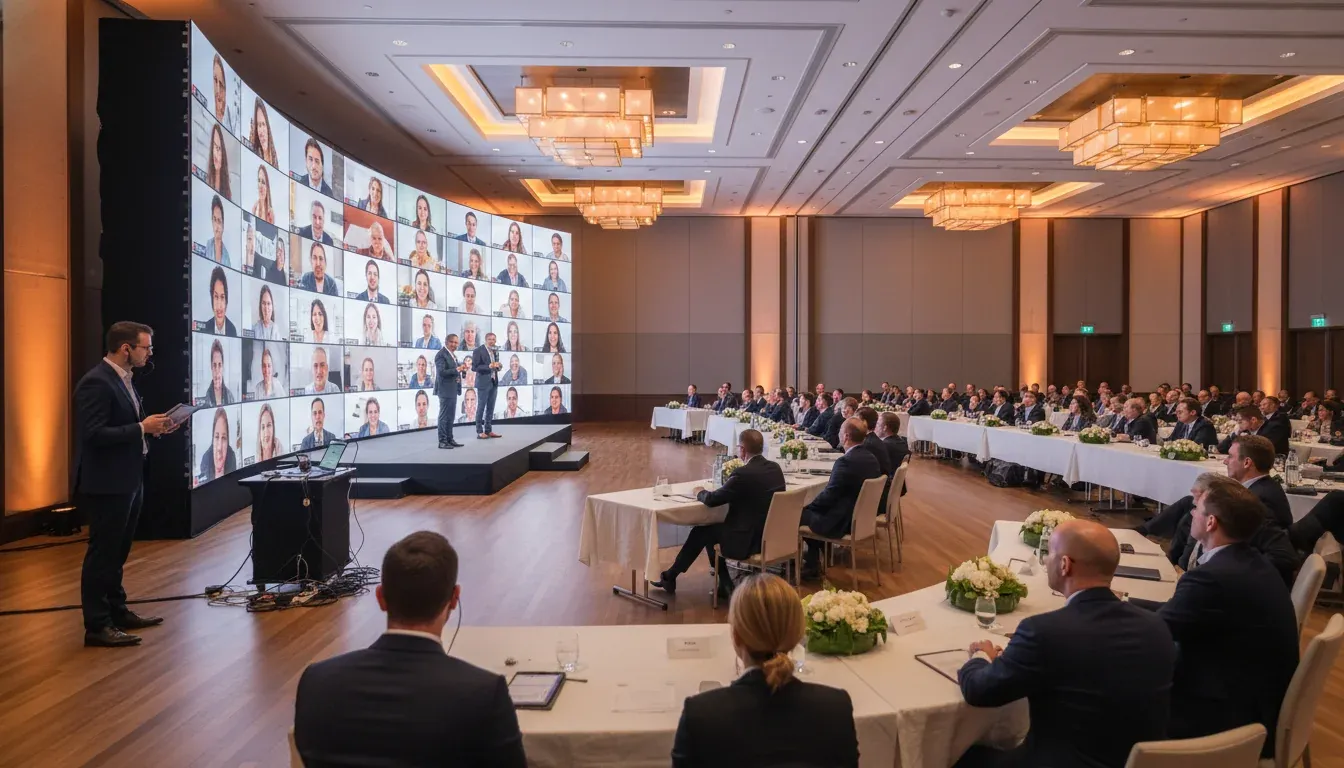
Hybrid event planning is the process of designing one event experience for two connected audiences: attendees who are physically present and attendees who participate online. The goal is not to livestream a room and call it hybrid. The goal is to build content, networking, sponsorship, and engagement around both attendee journeys from the start.
A strong hybrid format can expand reach, improve accessibility, create more content assets, and give sponsors more measurable touchpoints. But it also adds complexity. Planners need to think like producers, experience designers, broadcast teams, and community managers at the same time.
The best hybrid events share a few traits:
- One event strategy: The in-person and virtual experiences support the same business goals.
- Two attendee journeys: Each audience has a clear path for content, networking, support, and follow-up.
- Intentional technology: Platforms, cameras, audio, registration, and analytics are selected around the experience, not the other way around.
- Active facilitation: Hosts, moderators, and staff make virtual attendees visible and involved.
- Measurable outcomes: The event team tracks attendance, engagement, leads, session activity, and post-event behavior for both audiences.
Start With the Purpose, Not the Platform
Many hybrid events struggle because the planning starts with a technology question: Which streaming platform should we use? That matters, but it is not the first decision. Start with the business purpose of the event and the value each audience should receive.
Ask these questions before choosing a platform or production vendor:
- What should in-person attendees be able to do that virtual attendees cannot?
- What should virtual attendees receive that makes the online pass worth buying?
- Which sessions need to be live, and which can be on demand?
- How will exhibitors, sponsors, and speakers connect with both audiences?
- What does success look like after the event: registrations, meetings booked, qualified leads, sales conversations, content views, or community growth?
For example, The Event Planner Expo uses the strength of a live New York City conference, including exhibitors, speaker sessions, and networking, while virtual ticket options expand access beyond the people who can travel to the venue. That is the right way to think about hybrid. The virtual experience is not an afterthought. It is a deliberate extension of the event’s reach.
Build Two Attendee Journeys That Feel Equally Valuable
Equal value does not mean identical access. A person walking a trade show floor will always have a different experience than someone watching from home. The planning challenge is to make both journeys feel intentional, supported, and worthwhile.
The in-person journey
In-person attendees value atmosphere, access, spontaneous conversations, vendor discovery, and shared energy. Your onsite journey should make it easy for them to navigate the venue, attend the right sessions, meet exhibitors, and act on the opportunities in front of them.
- Use clear arrival communication, signage, and check-in flow.
- Design session transitions so attendees know where to go next.
- Give exhibitors high-traffic moments and clear lead capture tools.
- Create networking pockets beyond the main stage and trade show floor.
- Use the mobile agenda to remind attendees about livestreamed or hybrid sessions.
The virtual journey
Virtual attendees value convenience, clarity, access to content, and the ability to participate without feeling invisible. Your virtual journey should make it obvious where to log in, what to watch, how to ask questions, and how to connect with other participants.
- Send login instructions early and again on event day.
- Offer a virtual lobby with agenda links, sponsor resources, and help desk support.
- Use a host who speaks directly to the online audience.
- Keep session pages clean, with chat, Q&A, speaker details, and downloadable resources in one place.
- Provide on-demand access after the live session when possible.
Hybrid planning gets easier when you map these journeys side by side. Look for moments where both groups can interact, and look for moments where each group needs its own experience.
Technology Requirements for a Seamless Hybrid Event
Hybrid event technology should support four functions: access, broadcast, interaction, and measurement. If one of those functions is weak, the attendee experience suffers.
1. Registration and ticketing
Your registration system should support separate ticket types for in-person, virtual, VIP, exhibitor, sponsor, and press access. It should also allow segmented email reminders, badge data, check-in lists, and post-event reporting. For a conference with multiple access levels, this is essential.
2. Streaming and event platform
The platform should match the event format. A single keynote may only need a reliable livestream player and moderated chat. A multi-day conference may need session tracks, sponsor booths, networking rooms, Q&A, polls, analytics, and on-demand replay.
3. Camera, audio, and lighting
Audio quality matters more than almost anything else in a hybrid event. Virtual attendees will forgive a simple camera angle before they forgive echo, low volume, or inconsistent microphones. Plan for dedicated microphones, a clean audio feed, stable lighting, camera coverage of speakers and audience moments, and a technical rehearsal.
4. Internet and redundancy
Do not rely on standard venue Wi-Fi for production. Use a dedicated hardwired connection, test upload speed, confirm bandwidth requirements, and have a backup connection. Build redundancy into laptops, encoders, power, microphones, and recording.
5. Engagement tools
Polls, Q&A, chat, matchmaking, surveys, push notifications, and sponsor lead capture all help virtual attendees participate. Choose tools that your team can actually moderate. A simple, well-run Q&A is better than a complicated feature set nobody manages.
6. Analytics and reporting
Hybrid event data should show more than who registered. Track live attendance, session dwell time, replay views, poll responses, chat activity, sponsor clicks, meetings requested, content downloads, and survey feedback. These metrics help prove ROI to leadership and sponsors.
Hybrid Event Technology Checklist
Use this checklist during vendor selection and production planning:
- Ticketing: Separate passes for in-person and virtual audiences, automated reminders, attendee segmentation, and exportable reporting.
- Streaming: Stable player, backup stream option, recording, closed captions, and on-demand hosting.
- Production: Cameras, microphones, lighting, switcher, encoder, confidence monitors, and backstage communication.
- Venue internet: Dedicated wired connection, tested upload speed, backup hotspot or bonded cellular option, and onsite technical contact.
- Engagement: Moderated chat, live Q&A, polls, surveys, attendee directory, and meeting tools.
- Support: Virtual help desk, clear FAQ, onsite tech lead, and escalation plan for speakers or attendees.
- Measurement: Dashboard for registrations, attendance, engagement, sponsor activity, and post-event content performance.
How Do You Keep Virtual Attendees Engaged?
To keep virtual attendees engaged, plan participation moments every 8 to 12 minutes, assign a dedicated virtual host, and make online questions part of the live program. Remote attendees need visible acknowledgment, clear instructions, and reasons to stay active beyond simply watching a stream.
Here are the engagement strategies that make the biggest difference:
Use a virtual emcee
A virtual emcee is the bridge between the broadcast and the online audience. This person welcomes attendees, explains how to participate, highlights chat conversations, introduces polls, and brings online questions to the stage moderator.
Design questions for both audiences
Instead of asking, “Any questions in the room?” train moderators to say, “We are taking questions from the room and from our virtual audience.” That small shift signals that online participation counts.
Create virtual networking formats
Networking is often the hardest part of hybrid event planning. Give online attendees structured options such as small-group discussion rooms, speed networking, topic tables, sponsor meetups, or hosted chat sessions after keynotes.
Make sponsors visible online
Sponsor value should not stop at onsite signage. Give sponsors digital booth pages, downloadable offers, short video introductions, sponsored polls, session resources, and lead capture forms. Tie every benefit to reporting so sponsors can see what worked.
Use chat with purpose
Chat is not engagement by itself. Prompt it. Ask attendees where they are joining from, what challenge they are solving, which speaker point resonated, or what vendor category they want to explore. Assign staff to respond and connect people.
Want to see what high-value event industry networking looks like in action? Explore exhibitor opportunities at The Event Planner Expo and connect with event planners, corporate decision-makers, and marketing leaders.
Content Delivery Best Practices for Hybrid Events
Hybrid content should be designed for attention in the room and clarity on screen. That means shorter segments, stronger moderation, cleaner visuals, and more intentional transitions.
Shorten long sessions
A 60-minute keynote can work onsite, but virtual attendees often need a tighter rhythm. Consider 20- to 30-minute content blocks, followed by moderated Q&A, audience prompts, or a transition to a related breakout.
Prepare speakers for hybrid delivery
Speakers need to know where to look, how to repeat questions, how to include virtual attendees, and how to keep slides readable. Run a speaker briefing that covers microphone use, camera awareness, timing, and audience interaction.
Make slides screen-friendly
Slides that look fine in a ballroom may be hard to read on a laptop. Use larger fonts, high contrast, simple charts, and minimal text. If the content is complex, provide a downloadable resource instead of crowding every detail onto the slide.
Plan transitions like a broadcast
Dead air feels longer online. Build a run of show that includes countdowns, holding slides, lower thirds, sponsor breaks, host remarks, and clear transitions between sessions. Your production team should know exactly what happens during every minute.
Repurpose content after the event
Hybrid events create valuable content. Record sessions, edit highlight clips, turn Q&A into blog topics, send sponsor recap packages, and use session insights to guide future programming. A strong content plan extends event ROI long after the venue closes.
Budget Considerations for Hybrid Event Planning
Hybrid events can increase total production costs, but they can also expand reach, sponsorship value, and content ROI. The right budget depends on event size, audience expectations, number of sessions, production quality, and how much networking or sponsor activation is required online.
Plan for these budget categories:
| Budget Category | What to Include | Planning Note |
|---|---|---|
| Platform and registration | Ticketing, event platform, session access, analytics, email reminders | Choose based on attendee journey, not feature count. |
| Production | Cameras, microphones, lighting, switching, encoding, recording, livestream team | Audio and internet deserve priority funding. |
| Venue and internet | Dedicated bandwidth, hardwired access, power, room layout, onsite support | Confirm costs early because venue internet can be expensive. |
| Staffing | Virtual host, chat moderators, help desk, speaker manager, technical director | Hybrid events need people dedicated to the online audience. |
| Content and creative | Slides, graphics, holding screens, sponsor assets, captions, post-event edits | Plan assets before the event, not during production week. |
| Engagement and networking | Matchmaking tools, hosted rooms, surveys, giveaways, sponsor lead capture | Budget for facilitation, not just software. |
| Contingency | Backup equipment, additional labor, technical support, last-minute platform needs | Set aside 10% to 15% for hybrid complexity. |
If the budget is tight, protect the essentials first: reliable audio, stable streaming, clear attendee communication, and dedicated moderation. It is better to deliver a simple hybrid experience well than to overbuild a complex environment that the team cannot support.
Hybrid Event Staffing: Roles You Should Not Skip
Even the best platform cannot replace the right team. Hybrid events require onsite production support and online experience management. Assign clear ownership before event day.
- Executive producer: Owns the full event strategy, run of show, and final decisions.
- Technical director: Manages cameras, audio, switching, streaming, and technical rehearsals.
- Virtual host: Guides the online audience and connects them to the live program.
- Chat and Q&A moderators: Surface strong questions, handle comments, and keep conversations active.
- Speaker manager: Briefs speakers, manages timing, and supports remote presenters if any.
- Sponsor success lead: Makes sure exhibitors and sponsors understand their onsite and virtual deliverables.
- Attendee support lead: Handles login issues, access questions, and escalation for both audiences.
For large conferences, these roles should not be combined too aggressively. The person solving a microphone issue should not also be responsible for welcoming virtual attendees and moderating chat.
Case Study: The Event Planner Expo’s Hybrid Event Model
The Event Planner Expo shows how hybrid access can support a premium in-person event without limiting reach. The conference brings together 2,500+ attendees, 150+ exhibitors, corporate event planners, marketing professionals, business owners, and executives in New York City. Its live experience creates the networking energy, vendor discovery, and face-to-face conversations that event professionals value.
At the same time, virtual ticket options help the event reach people who cannot attend in person. That matters for busy corporate teams, national event professionals, and prospects who want access to industry content before committing to travel. The event also uses a mixed attendance model on key pages, which signals that hybrid access is built into the event structure.
This model works because the live event has a clear value proposition and the virtual option expands access. For planners building their own hybrid events, the lesson is simple: do not dilute the in-person experience to serve online attendees, and do not ignore online attendees because the room is full. Give each audience a reason to participate.
Common Hybrid Event Mistakes to Avoid
- Treating virtual as a camera feed only: A livestream is not a complete virtual experience. Add hosts, chat, Q&A, resources, and follow-up.
- Underestimating audio: Poor sound will drive online attendees away quickly. Invest in microphones, testing, and monitoring.
- Forgetting time zones: If your virtual audience is national or international, consider replay access and session timing.
- Overcomplicating the platform: Too many features can confuse attendees and overwhelm staff. Use what supports the event goals.
- Ignoring sponsors online: Digital sponsor deliverables should be planned, promoted, and measured.
- Skipping rehearsals: Rehearse with speakers, moderators, production staff, and the platform team.
- Using one communication plan: In-person and virtual attendees need different instructions, reminders, and support messages.
How to Plan a Hybrid Event Step by Step
Use this seven-step process to keep planning focused and practical:
- Define the event goal: Decide whether the event is built for lead generation, education, community, sales, brand authority, or retention.
- Map both attendee journeys: Document what in-person and virtual attendees will do before, during, and after the event.
- Select the right platform and production plan: Choose tools based on access, broadcast quality, engagement, and reporting needs.
- Design content for both formats: Build a run of show with shorter segments, hybrid Q&A, readable slides, and planned transitions.
- Assign dedicated hybrid roles: Staff the virtual host, moderators, tech lead, speaker manager, and attendee support desk.
- Rehearse the full experience: Test internet, audio, video, login flow, slide sharing, Q&A, and emergency scenarios.
- Measure and follow up: Report on attendance, engagement, sponsor activity, leads, survey feedback, and on-demand content views.
Frequently Asked Questions About Hybrid Event Planning
What is the biggest challenge in hybrid event planning?
The biggest challenge is giving virtual attendees meaningful participation while still protecting the energy of the live event. This requires dedicated staffing, strong moderation, reliable production, and content designed for both audiences.
How much does a hybrid event cost?
Hybrid event costs vary based on venue, production quality, number of sessions, event platform, staffing, and content needs. Most planners should budget beyond standard in-person costs for streaming, audio, video, platform access, moderation, and contingency.
What technology do you need for a hybrid event?
A hybrid event usually needs ticketing, a streaming or event platform, cameras, microphones, lighting, dedicated internet, attendee engagement tools, analytics, and technical support. Larger events may also need encoders, switchers, captioning, and backup connectivity.
How do you make a hybrid event interactive?
Make a hybrid event interactive by using live polls, moderated Q&A, chat prompts, virtual networking rooms, sponsor meetups, downloadable resources, and a virtual host who actively includes online attendees in the program.
Are hybrid events still worth it?
Hybrid events are worth it when the virtual experience expands reach, supports accessibility, creates content value, or gives sponsors additional measurable exposure. They are less effective when virtual access is added without strategy, staffing, or engagement.
Plan Hybrid Events With the Right Industry Connections
Hybrid event planning is not about choosing between in-person energy and virtual reach. It is about designing an event ecosystem where both audiences understand their value, know how to participate, and leave with a clear next step.
For event professionals, corporate planners, marketers, sponsors, and suppliers, the best way to improve future event strategy is to learn from people executing it at scale. Attend The Event Planner Expo to connect with the event industry, explore new technology, meet exhibitors, and experience how a modern conference can serve both live and virtual audiences.
Ready to build stronger event connections? Explore sponsorship opportunities or reserve your pass for The Event Planner Expo.