An accessible event planning checklist helps planners turn a commitment to inclusion into decisions guests can experience. It covers the attendee journey, from finding information and registering to arriving, participating, networking, and sharing feedback.
The strongest approach plans for different ways of moving, seeing, hearing, processing information, communicating, eating, and participating from the start. Retrofitting access after the venue and agenda are locked often costs more and delivers less. Use this guide as a practical working document for in-person and hybrid corporate events, while consulting qualified accessibility professionals when specialized support is needed.
Accessible event planning checklist: start with inclusion
Accessibility works best when it is a core planning responsibility, not a last-minute assignment. Name an accessibility lead early, give that person authority to coordinate across teams, and reserve budget for accommodations. The lead should work with venue contacts, registration teams, production partners, speakers, caterers, and digital platform providers.
Define ownership and budget
- Name one primary accessibility contact and a trained backup.
- Add accessibility requirements to vendor briefs, contracts, production schedules, and run-of-show documents.
- Budget for captioning, interpreting, accessible transportation, microphones, and alternative formats.
- Invite people with relevant lived experience to review plans and identify overlooked barriers.
- Create a process for receiving, confirming, and fulfilling accommodation requests.
Do not assume one solution works for everyone. Two attendees with similar disabilities may prefer different support. Offer choices where practical, ask respectful questions, and let each attendee describe what enables participation.
Review the entire attendee journey
Walk through the event as a first-time guest. Can someone understand the website, register with assistive technology, reach the venue, enter without stairs, locate a restroom, join sessions, network, and leave safely? For hybrid guests, test every step from joining the platform to asking questions and accessing materials afterward.
Include accessibility reviews at venue selection, registration launch, agenda development, speaker onboarding, technical rehearsal, and final production meetings. Repeated review catches barriers while the team still has time to solve them.
How do you evaluate venue accessibility?
Never rely only on a venue’s statement that it is accessible. Schedule a walkthrough and verify the routes guests will actually use. Ask the venue to include operations, security, catering, and audiovisual representatives so practical questions receive clear answers.
Check arrival, entrances, and movement
- Confirm accessible parking, passenger drop-off areas, nearby transit, and routes from each arrival point.
- Identify step-free entrances and ensure they will be unlocked, staffed, and clearly marked.
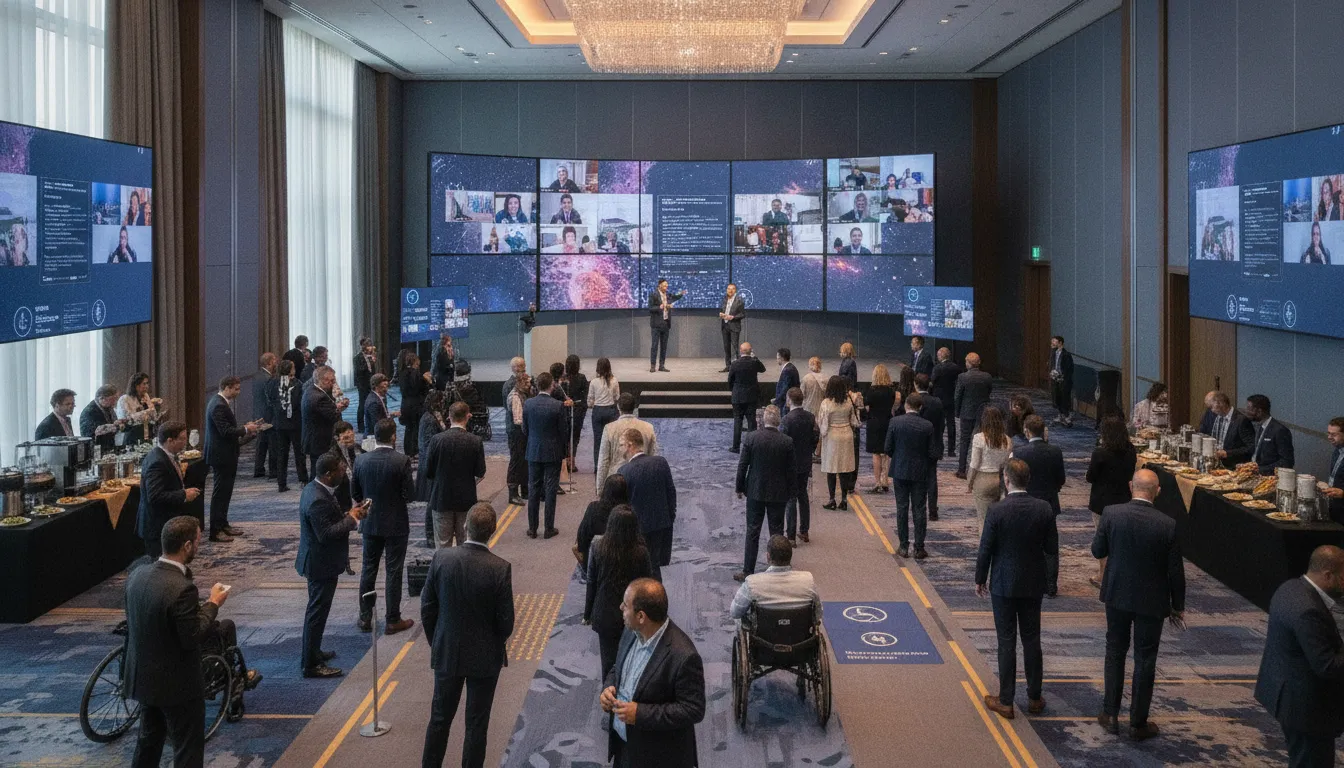
- Confirm doorways, aisles, elevators, and routes support mobility devices without separate paths.
- Check that registration desks have a lowered section and room for seated interaction.
- Confirm accessible restrooms are open, easy to locate, and not used for storage.
- Plan integrated seating choices with companion seating and clear sightlines.
Inspect the stage, green room, networking zones, dining areas, and off-site experiences. A ballroom may have an accessible entrance while the stage does not. Ask how a speaker using a mobility device will reach the stage and whether podiums, panels, and microphones adjust.
Make the venue easy to navigate
Clear signs reduce stress for all guests. Use large, high-contrast type and plain directional language. Place signs at decision points, keep routes free of boxes and loose cables, and tell attendees which entrance to use. Share an access guide with arrival instructions, photos, transportation details, restroom locations, quiet-space information, and the accessibility contact.
Discuss emergency procedures with the venue. Staff should understand how to communicate alerts in more than one format and assist people who cannot use stairs. This checklist supports better planning, but it does not replace professional or legal guidance.
Build accessibility into registration and communication
Registration is the moment to invite attendees to share what they need. Make the form keyboard-friendly, clearly labeled, easy to understand, and compatible with common screen readers. Avoid making guests explain the same request to multiple teams.
Ask useful and respectful questions
Include an optional prompt such as, “What accommodations or access support would help you participate fully?” Provide examples without limiting answers. A follow-up can ask about communication preferences, mobility access, seating, dietary needs, or support for a service animal. Explain how information will be used, who can access it, and request deadlines.
- Provide a named contact and more than one way to reach them.
- Confirm each request promptly and discuss details directly with the attendee.
- Do not ask for unnecessary medical information.
- Keep accommodation information private.
- Send a final confirmation explaining what has been arranged.
Communications should describe available access features before someone buys a ticket. Include captioning, interpretation, mobility routes, quiet spaces, food labeling, virtual platform features, and transportation details. Be honest about limitations and explain how guests can request support.
Offer information in flexible formats
Use descriptive link text, alt text for meaningful images, readable contrast, and captions on promotional videos. Avoid communicating essential details only through images or color. Share agendas and materials in accessible digital formats before the event when possible.
For more ideas, review these inclusive corporate event strategies.
Prepare speakers and content for more attendees
Accessible content is a production standard. Give each speaker a brief and reinforce it during rehearsal. Speakers should use microphones even if they project well, because clear audio supports attendees, interpreters, captioners, recordings, and remote participants.
Set accessible presentation standards
- Use large, readable type with strong contrast and uncluttered slide layouts.
- Add alt text to meaningful images and describe important visuals aloud.
- Explain charts rather than telling guests to look at them.
- Use plain language and define specialized terms.
- Provide materials in advance in accessible formats.
- Repeat audience questions into the microphone.
- Build pauses and breaks into longer sessions.
Moderators should support different participation methods. They can accept questions verbally, through a digital tool, or from remote chat. A moderator should identify speakers by name, manage cross-talk, and include remote attendees.
Coordinate captioning and interpretation
Book qualified providers early and share agendas, speaker names, terminology, and materials in advance. Reserve appropriate sightlines and lighting for interpreters. Test how captions appear on in-room screens and virtual platforms. If recordings will be available, confirm captions and transcripts remain accurate.
What does an accessible hybrid event require?
A hybrid event creates two attendee journeys that must connect. The virtual experience should offer meaningful participation, not simply a camera pointed at a stage. Assign team members to monitor remote questions, troubleshoot access issues, and make online attendees visible to speakers.
| Planning area | In-person experience | Virtual experience |
|---|---|---|
| Arrival | Step-free routes, signs, staffed access points | Simple joining instructions and support contact |
| Communication | Microphones, captions, interpreters, readable screens | Live captions, accessible chat, visible interpreters |
| Participation | Integrated seating and several question methods | Keyboard controls, moderated chat, remote Q&A |
| Materials | Accessible digital copies | Accessible downloads and captioned recordings |
| Support | Visible trained staff | Dedicated technical support |
Test the platform with keyboard-only navigation and common assistive technologies. Check whether attendees can locate controls, turn captions on, enter breakout rooms, use polls, and submit questions. Avoid relying on chat alone for urgent instructions. Read important chat updates aloud and display them visually.
Run a complete rehearsal using the equipment, connection, settings, captioning workflow, and speaker positions planned for the event. Test backup audio and connection plans. A short rehearsal can uncover problems invisible in a vendor specification sheet.
Plan for sensory and dietary needs
Sensory inclusion affects lighting, sound, scent, schedule design, crowd flow, and opportunities to take a break. Provide a quiet space away from networking traffic, explain its purpose, and keep it free of meetings. Share information about flashing lights, loud audio, effects, or strong scents before the event.
Reduce avoidable sensory barriers
- Avoid unnecessary strobe effects and sudden sound changes.
- Provide lower-stimulation seating where practical.
- Schedule breaks and explain when doors can be used.
- Limit strong fragrances in decor and amenities.
- Keep signs and instructions consistent and concise.
- Train staff to respond calmly when someone requests a quieter route or space.
Dietary inclusion requires direct coordination. Ask about dietary needs during registration, confirm details with attendees, and discuss ingredients and cross-contact procedures with caterers. Label food clearly and keep labels beside the correct dishes. Ensure alternative meals are served with dignity and at the same time as others.
Water stations, dining surfaces, and buffet layouts should work from seated and standing positions. Leave room between tables and avoid narrow queues. When possible, offer seated service or assistance for guests who cannot carry a plate.
Run the event, gather feedback, and improve
The day-of team turns the plan into a guest experience. Brief staff, volunteers, venue teams, security, speakers, and vendors on the access plan. Everyone should know the primary contact, quiet-space location, accessible routes, response process, and escalation path.
Complete a final day-of check
- Walk every accessible route before doors open and remove barriers.
- Test microphones, captions, screens, virtual controls, and backups.
- Confirm signs are visible and accurate.
- Check reserved seating and sightlines.
- Verify dietary labels and service plans.
- Make the accessibility contact easy to find.
When an issue occurs, listen first, explain what can be done, and act quickly. Avoid debating whether a request is necessary. Record the issue and resolution so the team can prevent the same barrier later.
Ask focused feedback questions
A generic satisfaction survey may not reveal access barriers. Ask whether attendees could find information, navigate the venue or platform, understand presentations, participate in their preferred way, and receive requested support. Include an open field and allow anonymous responses.
Turn findings into assigned actions. Each event provides evidence that can improve the next brief, budget, contract, and run of show. Explore potential partners through the 2026 exhibitor list, learn more about The Event Planner Expo, or review ticket options.
Frequently asked questions
What should an accessible event planning checklist include?
It should cover ownership, budget, venue routes, registration, communication formats, content, captioning, interpretation, sensory needs, dietary needs, staff training, emergency planning, hybrid technology, and feedback.
When should accessibility planning begin?
Begin before selecting a venue or locking the agenda. Early planning provides more vendor choices, supports budgeting, and makes accessibility part of standard production.
How can planners ask attendees about accommodations?
Use an optional, open-ended registration question asking what support would help the attendee participate fully. Give examples, provide a named contact, protect privacy, and confirm arrangements directly.
How do you make a hybrid event more accessible?
Choose an accessible platform, provide accurate captions, test keyboard navigation, share accessible materials, give remote guests ways to participate, and assign dedicated support.
Put your inclusive event plan into action
Use this accessible event planning checklist to create a working plan, assign responsibility, and review decisions through the attendee journey. Then connect with event professionals, technology providers, venues, and creative partners at The Event Planner Expo.
Get tickets to The Event Planner Expo and explore partners that can help make your next corporate event more welcoming and effective.